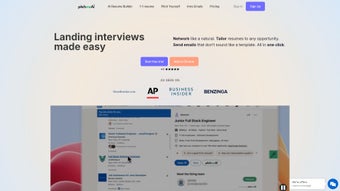

Download PitchMeAI – AI‑Powered Job Application Manager, Free Trial Available
Overview
PitchMeAI is a cloud‑based, subscription‑driven platform that redefines how job seekers manage their application pipeline. Built on cutting‑edge artificial intelligence, the tool automates resume tailoring, streamlines recruiter outreach, and organizes networking activities—all from a clean, browser‑first interface. In today’s competitive talent market, the ability to quickly adapt a CV to a specific posting and send personalized recruiter emails can be the difference between landing an interview or being overlooked.
PitchMeAI eliminates manual copy‑and‑paste work by analyzing job descriptions, extracting key skills, and recommending bullet‑point edits in real time. Beyond document handling, the application provides a built‑in messaging hub that tracks every email sent to recruiters, flags unanswered messages, and suggests follow‑up content based on AI‑generated insights. Users can also map their professional network, identify warm introductions, and schedule outreach directly through the platform.
By centralizing these essential job‑search activities, PitchMeAI helps users focus on interview preparation and career growth rather than administrative chores. The service offers a 14‑day free trial, after which a monthly or annual subscription unlocks unlimited AI tweaks, premium templates, and priority support. Whether you’re a recent graduate, a mid‑career professional, or a senior executive, PitchMeAI promises a more organized, less stressful path to landing your desired position.
Key Features & Installation Guide
Feature List
- AI‑driven resume parser that matches keywords to job postings in seconds.
- One‑click resume customization with industry‑specific templates.
- Automated recruiter outreach email generator with personalization tokens.
- Integrated networking dashboard that visualizes connections and warm introductions.
- Smart follow‑up reminders based on email open rates and recruiter response patterns.
- Secure cloud storage for multiple versions of CVs, cover letters, and portfolios.
- Real‑time analytics showing application success rates and suggested improvements.
- Collaboration mode for career coaches or mentors to review and comment on drafts.
- Browser extensions for Chrome, Edge, and Firefox to import job postings directly.
- 24/7 chat support and a knowledge base with step‑by‑step tutorials.
Installation & Usage Instructions
Because PitchMeAI is a web‑based SaaS solution, there is no traditional software download or installation required. Users simply need a modern browser (Chrome 94+, Edge 94+, Firefox 93+, or Safari 14+) and an active internet connection. To get started, follow these steps:
- Visit the official website at pitchmeai.com and click the “Start Free Trial” button.
- Create an account using your email address or sign in with Google/LinkedIn for quick onboarding.
- Complete the brief onboarding questionnaire that asks about your industry, target roles, and preferred resume format.
- Upload your existing resume (PDF, DOCX, or plain text). PitchMeAI’s AI engine will instantly scan and index the content.
- Browse the job board or paste a job description URL. The platform will highlight required skills and suggest targeted modifications.
- Choose a template from the library, apply AI‑generated edits, and preview the final document before saving.
- Navigate to the “Recruiter Hub” to compose personalized outreach emails. Use the dynamic tags (e.g., {FirstName}, {Company}) to auto‑populate fields.
- Track sent messages, set follow‑up reminders, and review analytics on a dashboard that updates in real time.
- If you prefer to work offline, use the “Export” button to download a PDF or DOCX version of any customized resume.
The entire workflow is designed to be completed in under ten minutes per application, dramatically reducing the time spent on repetitive tasks. For teams, an admin can invite colleagues, assign roles, and share feedback directly within the platform, making PitchMeAI a collaborative job‑search hub.
Compatibility, System Requirements, and Pros & Cons
Supported Operating Systems
PitchMeAI runs entirely in the cloud, so it is compatible with any device that can access a modern web browser. Officially supported platforms include:
- Windows 10/11 (Chrome, Edge, Firefox)
- macOS 12+ (Safari, Chrome, Firefox)
- Linux distributions with recent Chromium‑based browsers
- Android 9+ (Chrome mobile)
- iOS 13+ (Safari, Chrome)
Because no local installation is required, updates are applied instantly on the server side, guaranteeing that every user always works with the latest AI models and security patches.
Pros
- Time‑saving automation: AI instantly rewrites resumes to match each job posting.
- All‑in‑one dashboard: Manage resumes, emails, and networking from a single interface.
- Cross‑platform access: Use on Windows, macOS, Linux, Android, or iOS without installation.
- Data security: End‑to‑end encryption and GDPR‑compliant storage protect personal information.
- Scalable pricing: Monthly and annual plans with a free trial, suitable for freelancers to enterprise teams.
Cons
- Subscription cost may be a barrier for users on a very tight budget.
- AI suggestions sometimes require human judgment to avoid over‑keyword stuffing.
- Requires stable internet; offline functionality is limited to export only.
- Advanced analytics are only available on higher‑tier plans.
- Learning curve for users unfamiliar with AI‑driven editing tools.
Overall Rating: 4.5 / 5 – PitchMeAI offers a powerful blend of AI automation and user‑friendly design that makes job hunting far less chaotic. While the subscription price is a consideration, the productivity gains and higher interview rates justify the investment for serious job seekers.
Frequently Asked Questions (FAQ) & Final Thoughts
Can I use PitchMeAI on a mobile device?
Yes. PitchMeAI’s responsive web design works on Android and iOS browsers, allowing you to edit resumes and send recruiter emails directly from your smartphone or tablet.
Is my personal data safe?
PitchMeAI employs AES‑256 encryption for data at rest and TLS 1.3 for data in transit. The service is GDPR‑compliant and undergoes regular third‑party security audits.
Do I need a paid subscription to access AI features?
All AI‑driven resume and email suggestions are available during the 14‑day free trial. After the trial, a subscription is required to continue using the AI tools.
Can I export my customized resume to different file formats?
Yes. PitchMeAI lets you download your final resume as PDF, DOCX, or plain text, ensuring compatibility with any applicant tracking system (ATS).
How does the AI determine which keywords to add?
The engine parses the job description, identifies high‑frequency terms and required competencies, then cross‑references them with your existing experience to suggest natural‑sounding additions.
Conclusion & Call to Action
In a market where every application competes for the attention of busy recruiters, PitchMeAI equips job seekers with the technology to stand out effortlessly. By automating resume tweaks, personalizing outreach, and keeping the entire job‑search workflow organized, the platform turns a traditionally stressful process into a streamlined, data‑driven experience. The cross‑platform accessibility, robust security, and real‑time analytics make it a compelling choice for anyone serious about accelerating their career trajectory. Ready to transform the way you hunt for jobs? Start your free 14‑day trial today and see how AI can help you land more interviews—fast, secure, and stress‑free.



.png)



